Arkio 2.2 - Simpler workflows, movable objects and design collaboration for everyone
 Hilmar Gunnarsson May 5, 2026
 Arkio 2.2 is all about making immersive design collaboration easier to start, easier to share and more useful once you are inside your model. We are simplifying our pricing, streamlining plugin workflows and adding movable objects from Revit, Rhino and SketchUp so teams can test real design options together at human scale.
Putting design collaboration in more hands
With Arkio 2.2 we are introducing a simpler pricing model. We are lowering the price of Arkio Pro to bring the power of Pro to more people, removing the Plus plan, and making the free Starter plan more capable with support for large 3D models in OBJ and GLB formats and unlimited one-on-one meetings. At the same time, Arkio Pro and Enterprise are becoming even more powerful with simplified plugin workflows, larger meetings, greater control, and advanced features like movable components. As a special thank you, existing Plus subscribers will receive access to all current Pro features at no additional cost.
We are making this change because our goal is to put design collaboration in the hands of as many people as possible.
Buildings affect how people work, heal, learn, gather and live. Yet too many design decisions still depend on drawings and rendered images that require training and imagination to fully understand. Those tools are essential, but they do not tell the whole spatial story. There is simply no substitute for stepping into a space at full scale, feeling it, and discussing the space with others while everyone is looking at the same thing.
We believe making XR design collaboration more accessible can lead to less waste, fewer misunderstandings, lower costs, faster decisions and, most importantly, better spaces for the people who will use them. That applies whether you are building your own home, studying architecture, coordinating construction, designing building systems or reviewing a complex project with a client.
You can compare the updated plans on our pricing page.
From design tool to VR in one step
Arkio 2.2 drastically simplifies the import workflow when using our Revit, Rhino and SketchUp plugins. The plugins now guide you with clear settings and a live progress bar, then open Arkio on your PC to process the model. From there, Arkio can place the model into a scene that automatically opens on your Meta Quest or any other cloud-connected device. Going from your design tool of choice to experiencing the model in Arkio is now as easy as pressing a button.
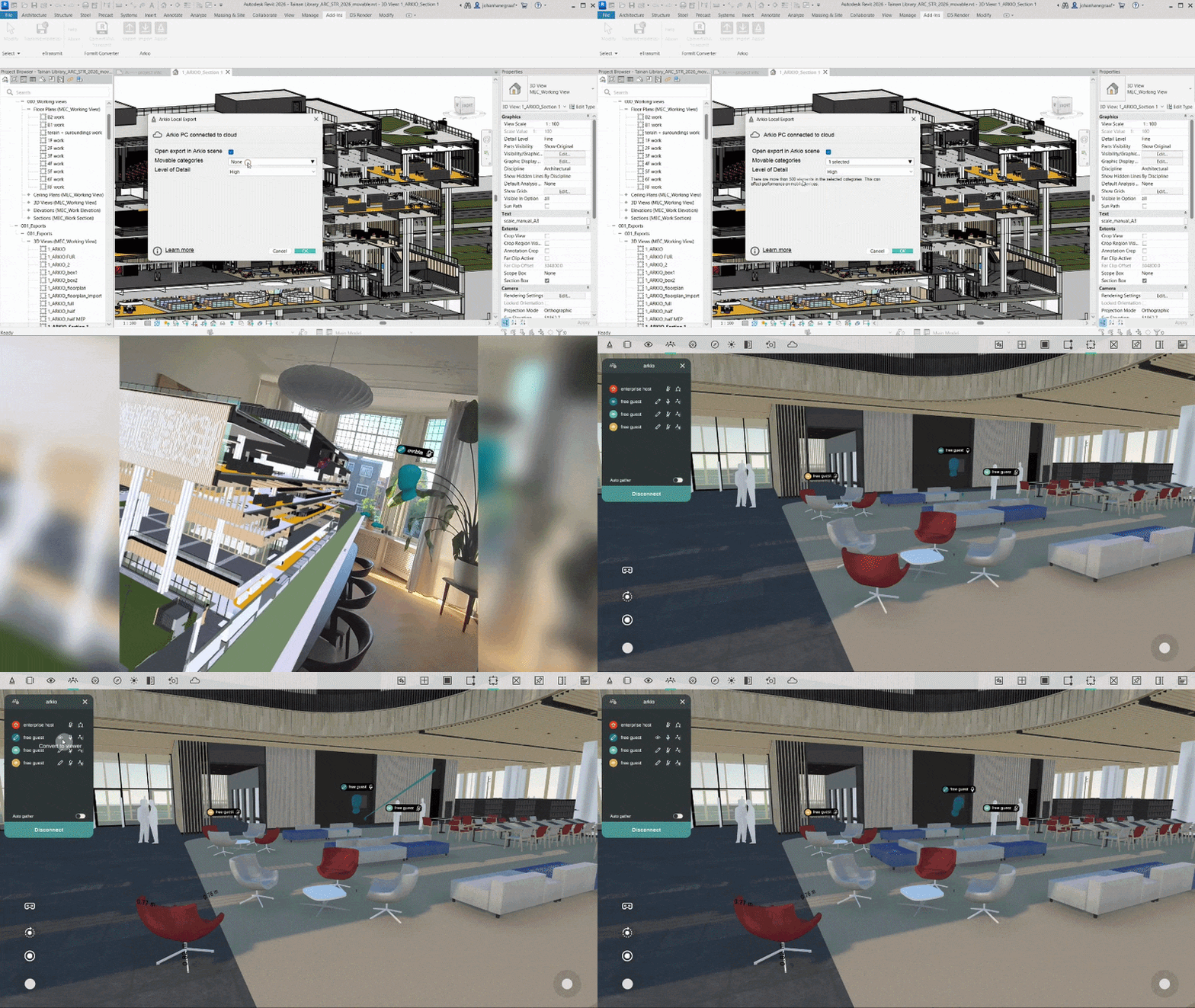
That matters because immersive review is most valuable when it can happen during the real design process, not after someone has spent time rebuilding or optimizing a separate presentation model. The easier it is to move from Revit, Rhino or SketchUp into Arkio, the easier it becomes to use XR when the discussion is still open and decisions can still change.
Movable objects from your existing models
While we are simplifying the workflow, we are also making Arkio much more capable. Arkio 2.2 adds the ability to select movable Revit families, Rhino blocks and SketchUp components and bringing these into Arkio as individual editable objects.
These movable objects behave like native Arkio geometry. You can pick them up, reposition them, rotate them, test alternatives and review the result together in real time. When you are done, you can export the changes back to the original design tool while preserving the integrity of the source model.
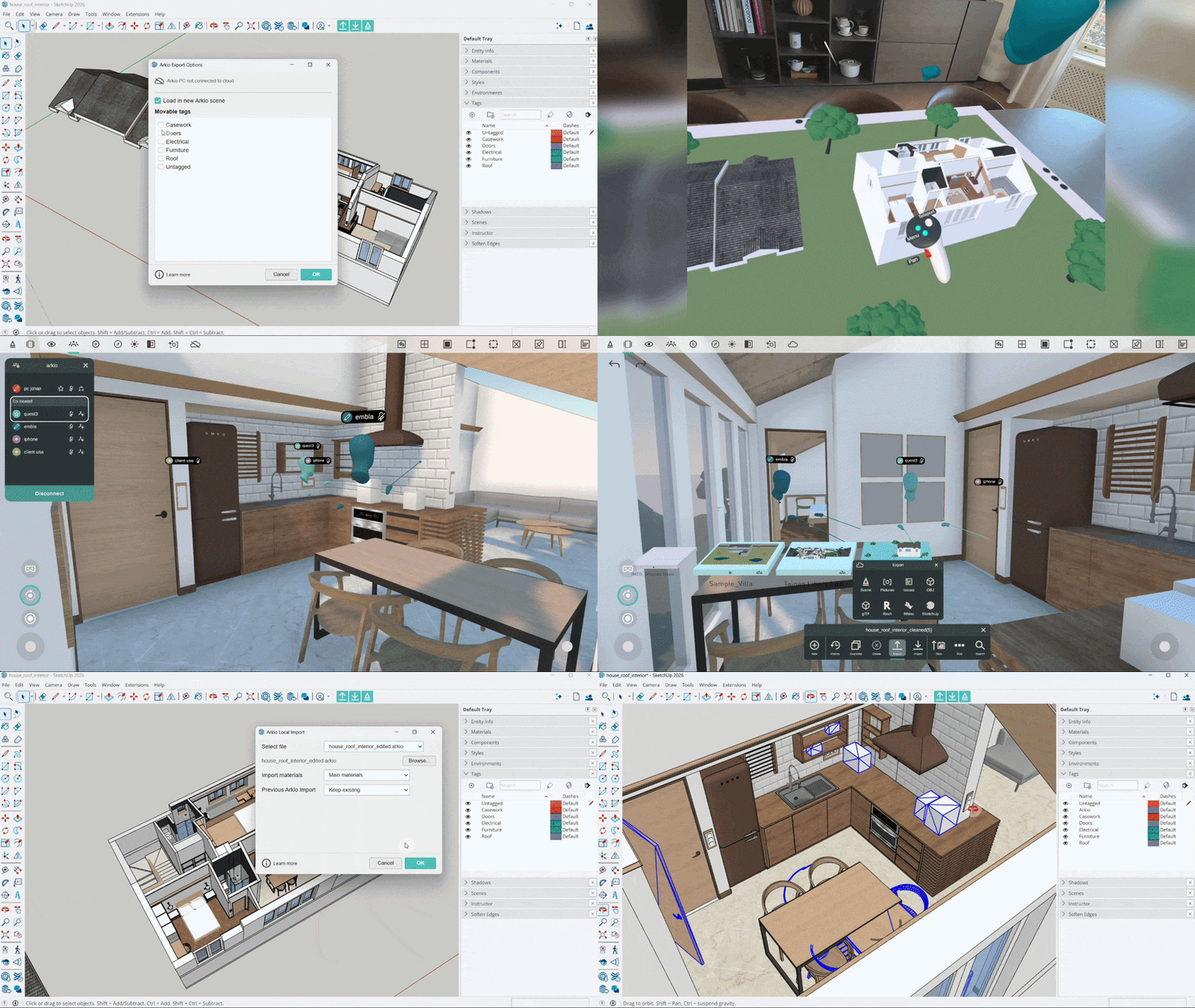
This opens up a wide range of practical workflows. A healthcare team can test the layout of an operating room and check equipment clearances with clinicians. A construction team can explore sequencing and access. A designer can rearrange furniture in a living room with a client standing inside the space. Instead of talking around a drawing, teams can work directly with the design at the scale people will actually experience it.
Each project can include up to one thousand movable objects, supported by an updated level-of-detail system designed to keep larger imports performant across devices, including Meta Quest headsets.
IMEG shows what this unlocks
This workflow is already proving useful in real projects. In our new IMEG case study, Abby Coleman and the IMEG team describe how they use Arkio to review complex healthcare spaces, move medical equipment inside immersive models and help clients understand design decisions earlier.
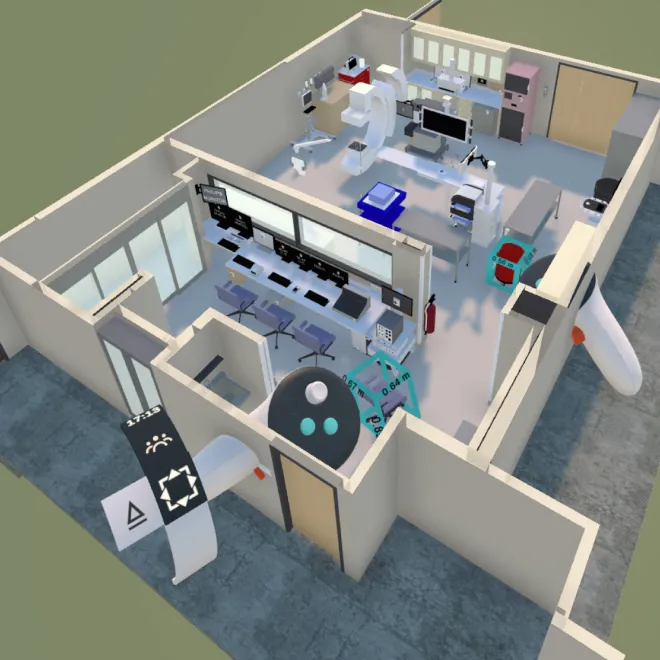
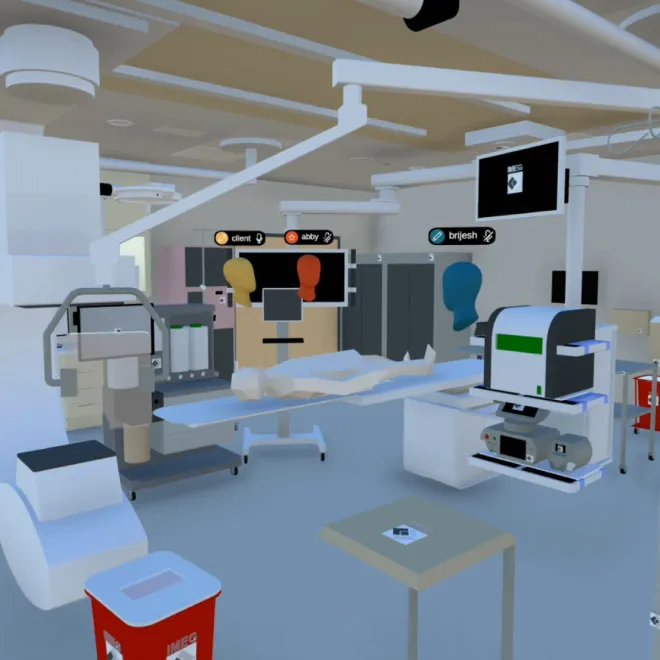
Healthcare projects are a powerful example because layout decisions directly affect workflow, safety, equipment access and the daily experience of staff and patients. In Arkio, those questions can be tested together at full scale. Teams can compare options, move equipment, capture feedback with notes and sketches, and reach alignment faster than they could with 2D drawings alone.
That is the larger promise of Arkio 2.2: simpler access to immersive review, combined with more meaningful ways to interact with the actual design.
More improvements across Arkio
Arkio 2.2 also includes many other improvements across the app. Arkio Cloud has a dedicated status icon, clearer notifications and a unified panel available in both VR and non-VR modes. When importing or exporting to an unconnected device, Arkio can create a device group and show a link code to help you sync models automatically. You can also turn off cloud functionality at any time.
On PC, Arkio now starts in non-VR mode by default so it opens quickly before enabling VR for OpenXR-supported headsets. We have also added a new Arkio Labs tab for experimental features which today includes enabling hand-tracking in Arkio. Stay tuned for some exciting experimental features coming soon in Arkio Labs!
There are also many performance, visual quality, plugin, import and usability improvements throughout the release. You can read the full Arkio 2.2 changelog here.
Experience the unbuilt, together
We have always believed that the best design conversations happen when people can understand a space together. Arkio 2.2 brings us closer to that goal by making it easier for anyone to get started, while giving professional teams more powerful ways to bring real design models into XR, test ideas and send useful changes back to their existing tools.
We hope you enjoy Arkio 2.2, and we would love to hear what you create with it.